
Ergonomics for Working from Home during COVID-19 Pandemic
There has been 5.2 million of corona virus cases and 3.4 lac deaths due to COVID-19 throughout the whole world and is observing the lockdown for the last couple of months. There is considerable proportion of copulation who have been working from home (WFH) during the lockdown period, however they may or may not be habitual of working from home. Therefore, the workstation design and seating issues need to be considered especially while in teleworking the lock down due to COVID -19 Pandemic. This paper highlights the ergonomics for designing the work place so as to fitting the job, the equipment and the work environment to the employee who are working from home. There are number of issues related to the use of portable computing devices such as; laptop, smart phones etc. and the different postures adopted that deteriorate the physical health, these are need to be addressed. Therefore, ergonomic considerations are must for their safe and healthy working.
Introduction
There are about 7% of civilian workers in the United States, have access to a “flexible workplace” benefit, or teleworking, according to the 2019 National Compensation Survey (NCS) from the federal Bureau of Labor Statistics. About 33% of insurance employees have access for teleworking, followed by “professional and technical services” (29%), such as law firms, accounting firms, advertising agencies and consultancies. The information sector has the third-highest share of workers with teleworking access: 16% of workers in this industry have it. More over all the educational institutions are also allowing working from home through online meetings and classes [1].
Different Authors and Societies and organizations have given commendations for work station design and postural issues when using video display terminals (VDT and portable computing devises, like N-E-W mantra i.e. neutral posture, eyes, elbow height, Work area, and gave some work place self- assessment tips related to WFH [6, 7, 8]. However, International Ergonomics Association (IEA) has recommended the 20-20-
20 rule, i.e. there should be a planned break at least every 20 minutes and one should look at some object 20 feet away from the screen at least for 20 second [2, 3, 4, 5], it would be good if one looks at some green plant/tree. Also, the height of the screen at eye level i.e. the top of the screen should be at par of eyes (see above fig). He concluded with some tips for stretching during WFM at portable computing devices. As for as Indian IT industry is concerned, it has been successful to make their employees “Work from Home” (WFH) as per government’s mandate. There are around 90% of employees worked from home with 65% of them are from metros and rest 35% represents the small cities [1].
During the lockdown, the IT industry could changeover to WFH model quite smoothly providing business continuity to clients while maintaining the quality or productivity, equally amazing industry leaders as well as customers. This could be due to two reasons; one is that IT industry strictly adhere to quality processes and most important is availability of communication bandwidth both from homes in metros and in small towns [1]. However, despite the successful operations by the industry the three are still some ergonomic aspects related with WFH that cannot be ignored. These issues include; work station design, MSD, monotony and boredom, anxiety/Stress, disturbance/Discontinuity/ lack of Concentration, others like; economical and job security.
It is reported by some studies that the teenagers believe that they can manipulate six to seven forms of media simultaneously and 95% of the population is multitasking every day. The adults check their smart phones every 6-7 minutes. In UK more than 50% population check their smart phone every hour. Around 75% of population of US get panic when they cannot locate their smart phone and 50% people check their smart phone during waking up and still in the bed. Around 33% person check their smart phone even in the bathroom and during the meal and just when they receive the notification. The situation in India is also not good in these aspects. The people during lockdown suffer from low back pain once or twice a week or even a day.
Methods for Mitigation
At the same time if we consider the employer side, there are number of challenges and significant technical complications for employers to obtain the full understanding of every employee’s home workplace. However, employees are still required to ensure that; the home workplace is a safe and healthy area to work, systems of work at home are safe and healthy, appropriate training like home office ergonomics is provided, the if any incidents are investigated and hazards are adequately controlled, employees are supported in their home environment.
Additionally, the training and adoption of suitable strategies to lessen the hazards due to physical and mental health conditions are also very important for teleworking scenarios. Therefore, without investing much on an external consultant, employers can help the employees improve their health and safety while working from home. When employees are working from home, the employers must understand and considers that they are actually in their home where they live their lives which is outside of the workplace. Thus, there is a clear differentiation between what is “in the course of employment” and normal activities.
It would be apt if the employers formulate clear understanding and regime of working hours, planned rest breaks while considering how working from home can affect it. Also, the employers need to observe that from where employees will be working i.e. home office, spare room, or study room etc.. Therefore, considering this as the primary place of work, the employer must ensure that it is safe for the employee.
The employee’s home workstation set up, posture and equipment are also critical. Ergonomically poor workstation can leads to musculoskeletal complaints, including muscle strain, other long and short -term injuries, as well as tripping or falling hazards.
Employers should enquire whether the employees have appropriate works station or home office. If not, employers ought to help them by purchasing new equipment, borrowing equipment from the office or encouraging employees to buy their own equipment. Getting employees to create as much of a comfortable, ergonomic space as possible is important.
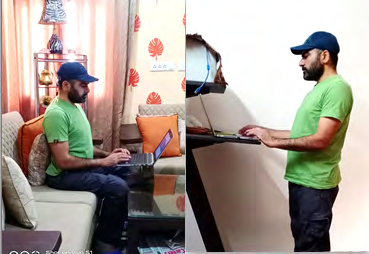
Recommendations for using Portable Computing Devices while Working from Home
Since the body posture is the major factor that determine biomechanical strain and the load on the lumber-sacral region of the spine. Therefore, posture adopted is one of the main factors responsible for the MSDs like; the back pain, neck pain, wrist pain, shoulder pain, knee pain, ankle pain in the body. Therefore adopting the neural posture is of vital importance. Any forward bending posture when maintained lead to intra-discal pressure and that ultimately lead to low back pain or sciatica pain. Therefore, maintain the S shape posture of the spine is very important. International Ergonomics Association (IEA) recommended that alternate between sitting and standing position when using digital devices (Figure 1). A combination of 10-min of sitting, and 5-min of standing can be a better way to maintain workers ‘arousal level and work performance, otherwise, take a 2 min break every 20 min sitting. It is very useful for MSDs – non-communicable diseases such as type 2 diabetes, cardiovascular disease, and cancer, - inefficiency in work - excessive fatigue.
Additionally, the employees can assure their appropriate workstation at their homes by adopting recommendations laid out by the different agencies and societies. For example, one can remember the acronym N-E-W when setting up your workspace. The letter ‘N’ indicates maintaining the neutral posture i.e. the neck and shoulders should be straight, the wrists should be straight, and the lower back must be supported against a chair back or pillow. The letter ‘E’ is meant for elbows at right angles (90 degree) and the screen of monitor should be at eyes level, so that the angle of neck tilting up to 15-20 degree) and the elbows are in line with the home row keys of the keyboard. In addition, the last ‘W’ indicates that work area. Keep items used often in the primary work zone so you are not reaching repetitively [6, 7, 8]. Foam seat cushion for comfort, support and to raise the height of your chair. One can add a footrest for leg and foot support (i.e. small box etc.). In addition to the workstation, it is also good to raise the height of monitor or laptop, therefore textbooks or small box can be used, one should assure to provide space for proper ventilation from the bottom to keep it cool, therefore it should be avoided to use the laptops directly at the lap to allow air circulation. The distance from the screen or laptop should be 18 to 33 inches, or arm length (stretched out) so the fingertips are barely touching the center of monitor screen. It would be more apt to use an external keyboard and mouse. For hand and wrist support, a rolled up-lengthwise-face towel can be used as keyboard rest and small rolled-up washcloth as mouse rest. For hand and wrist support, use a rolled up-lengthwise-face towel as a keyboard rest.
Any forward tiling of neck more than 20 degree is dangerous for the cervical region; the maximum forward bending can be up to 60-degree forward increases the load on cervical/neck up to 30 kg. It is therefore very pertinent for the employees to ensure proper posture while using computing devises at their homes during lockdown.
There can be some eye related problems such as; burning/ itching in eyes, wateriness, redness, swollen, pain etc. International Ergonomics Association (IEA) recommended that practicing the 20-20-20 rule when using digital devices can be help full to avoid eyestrain musculoskeletal disorders (MSD; particularly in the neck) - inefficiency in work - excessive fatigue. According to it one should take a break every 20 minutes and look at least 20 feet away at least for 20 sec [2, 3, 4].
It has been reported that text messaging using the mobile device leads to a flexed neck, and a non-neutral typing- side wrist. (Gold JE, Driban JB, et al. 2012). Furthermore, predominantly handling the smartphone with one hand leads to higher mechanical stress on one side of the neck and shoulder/upper extremities. This could be avoided by frequently switching the hand holding the smart phone. Maintain a comfortable viewing distance between your eyes and the device you are holding; typically, more than 40cm. As per literature, the neck complaints have the highest prevalence rates, ranging from 17.3% to 67.8% worldwide. It was also found that neck flexion due to phone calls, texting, and gaming is related to musculoskeletal complaints among mobile device users. Cervical flexion angles during smartphone texting are associated with neck pain.
As for as the mental stress or anxiety is concerned it is very important for the employees to keep their mental balance and do not get panic due to COVID 19 Pandemic. It would be apt to check the news once or twice a day jus for the updates, otherwise it may be overbearing for the mental health. Only reliable and factual sources should be followed for the information, and avoid mainstream media that always exaggerate and emotionalize upsetting. The most important is to follow instructions from local administration, ministry of health, WHO and social distancing judiciously. However, it is ultimately up to the individual to decide whether they are referring to good source of accurate information.
Beside the MSD, there are other psychological issues related to home related issues like, insomnia, family/kids issues, mental disturbance, anxiety etc. along with being productive in WFH during lockdown in COVID -19 Pandemic. Therefore, making and maintaining the work schedules is very important. It is also very important to keep the others informed about the whole day schedule to the team members as well as family and friends so that they do not disturb you at the time of working. It is also important to keep some breaks for family and friends to make fun social calls. There is another issue related to managing the distractions like social sites and media, therefore there should be definite start and end time of such recreational or refreshing activities. It is important to identify the productive and non-productive phases of the day. For example, it is very refreshing and active in the morning contrary to post lunch phase when individuals feel lethargic. Therefore, one should schedule the important work during those productive active phases and avoid those slump periods. It would be very apt if employees do regular meditation, yoga and breathing exercise.
References
-
(2020) Work from home has been ‘successful’ during Covid-19 lockdown. What next?
-
Anshel JR (2007) Visual ergonomics in the workplace. AAOHN J 55(10): 414-420.
-
Computer Vision Syndrome. American Optometric Association.
-
Does the 20-20-20 rule prevent eye strain?
-
Shimomura Y, Aoki K, Kotani K, Toriizuka T, Ishibashi M, et al. (2020) Seven Practical Human Factors and Ergonomic Tips for Teleworking/Home-learning using Tablet/Smartphone Devices, 1st (Edn.), Japan Human Factors and Ergonomics Society (JES), The IEA Press, pp: 1-12.
-
Ergonomic Guidelines. Safety & Risk Service, The University of New Mexico, USA.
-
https://srs.unm.edu/assets/documents/UNM_Ergonomics. pdf
-
https://www.osha.gov/SLTC/etools/computerworkstations/ index.html
- The Expanding Landscape of Road Rage: A Systematic Review of Conflicts Involving Drivers, Pedestrians, and Micromobility
- Validating Cognitive Models of Royal Navy Performance on Control Systems
- Comparing Standard and State-of-the-art Firefighter Coats on Postural Balance and Gait in a Live Burn Environment
- Investigating the Integration of Telemedicine into Clinicians Workflow: A Review of Methods
- Risk Assessment of Ergonomic Factors in a Textile Firm by RULA, REBA and Fine Kinney Methods
- Impact of Self-Esteem Training on Individuals with Disabilities Aged 17-30